CHA Viewer
Retire Legacy Systems. Keep Every Record.
Save, search, view, and share legacy data from retired EHR, financial, and ERP systems — patient records first, and the employee, payroll, and ERP data alongside them — in one secure platform built for community, critical access, and rural hospitals.
A Safe Switch
Move Off Legacy Systems with Confidence
Viewer securely saves your legacy data off-site in its original format to meet retention requirements — then brings every record back together, searchable from a single login. Your team keeps working; nothing gets left behind.
Kept in Original Format
Records are preserved exactly as they were, meeting HIPAA, HITECH, and regulatory retention requirements.
Off Your Servers
Legacy data moves to a secure, isolated off-site tenant — retiring the hardware and the vendor maintenance fees with it.
Searchable From Day One
Every retired system's data comes back together in one place, ready to search the moment it goes live.
Search
Every Retired System, One Search
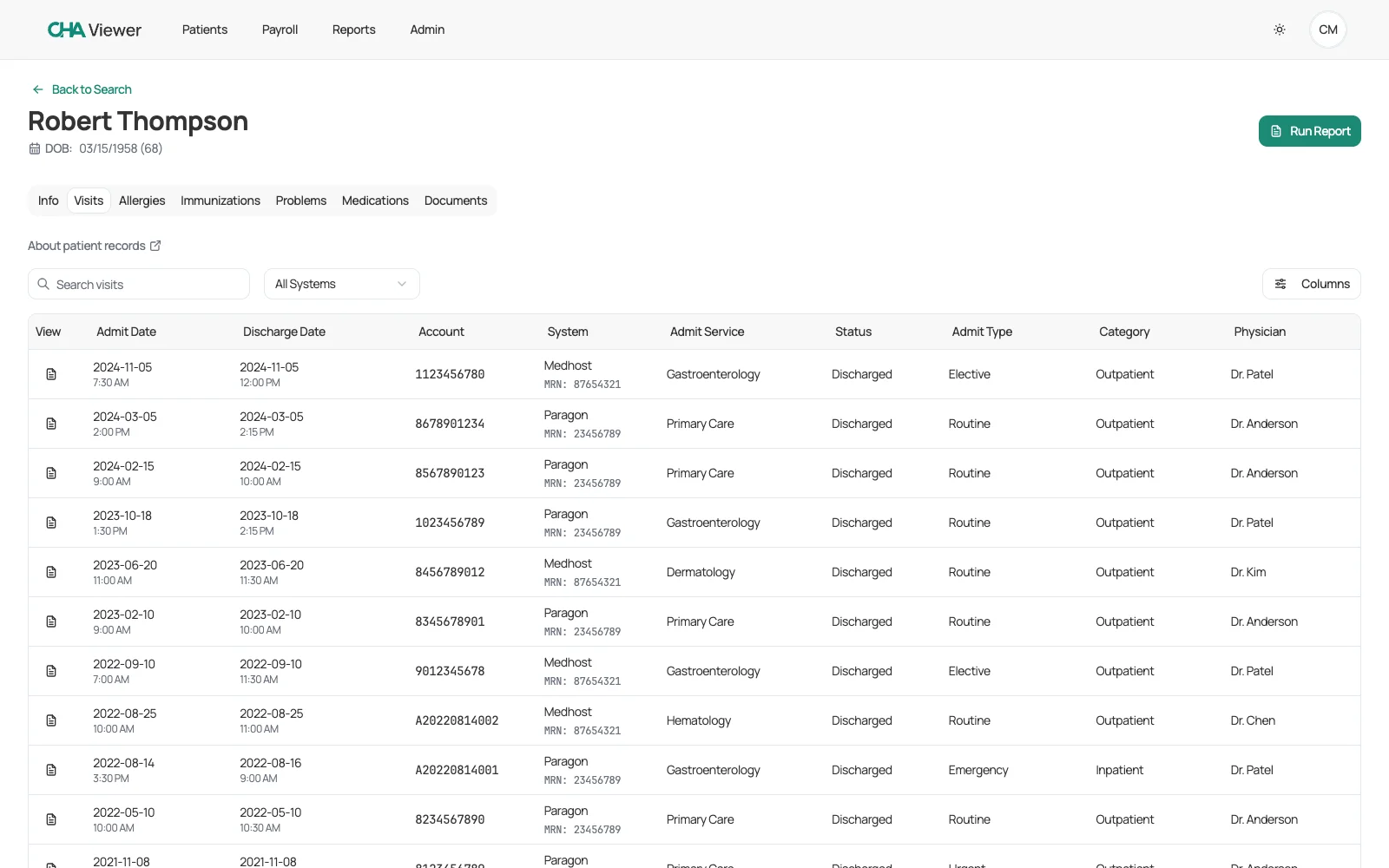
One Viewer login lets users search, filter, and see data from multiple retired systems in one place — no juggling old logins or keeping read-only servers alive.
- Complete patient history in a single report
- Every record retains a tag showing its original source system
See
Browse and Filter in a Fast Table
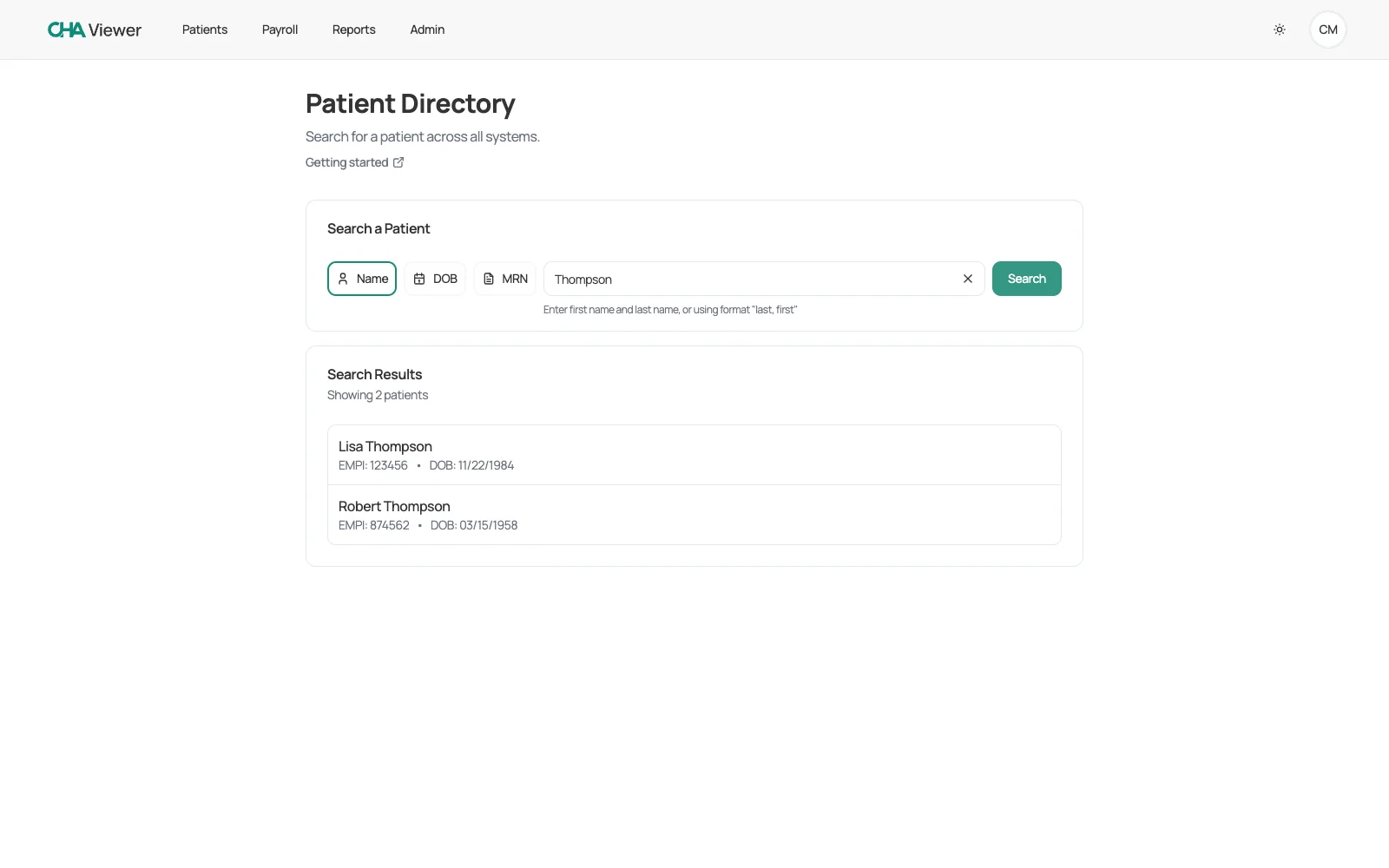
Legacy records load into a sortable, filterable table built for speed. Narrow years of visits from every retired system down to the exact set you need — live, as you type.
- View and filter most data in table format
- Filter by source system or search within any tab
- Download or send any view as a PDF
Send
Compile a Shareable PDF in Seconds
Turn any query into a secure, shareable PDF in seconds — the Release of Information workflow HIM teams run every day, without keeping the legacy system running.
- Release of Information (ROI) packets
- System-specific (MRN) reports
- Choose exactly which sections each report includes
Data Domains
Beyond Patient Data
Patient records are the heart of the archive — but Viewer keeps your employee, payroll, and full ERP data just as accessible.
Patient & Clinical Data
Complete legacy medical records — visits, documents, labs, and more — from every retired EHR, searchable in one place.
Employee & Payroll Records
Archived employee directory, pay-rate and pay-period history, and full pay-stub detail — the same retired-system continuity, extended to HR data.
Financial & ERP Data
General ledger, accounts payable and receivable, materials management, fixed assets, and HR/payroll from retired ERP systems such as Lawson and MEDITECH ERP.
Viewer archives data from legacy systems such as:
Clinical / EHR
Departmental
Document management
ERP / financial / HR / payroll
Guides
Archiving Guides by System
Read the details for your specific EHR, or the full playbook for shutting the old system down.
CHA Viewer
More Capabilities
Archived Documents
Every archived document — scanned records, progress notes, and more — categorized and sortable by type, date, and account, and viewable or downloadable in place.
Employee & Payroll Records
Search an archived employee directory and open full pay-rate, pay-period, and pay-stub history — filterable by employee status — without keeping the old HR system alive.
Pick Up Where You Left Off
Return to the exact record or report you were working on after a session times out — identity-matched on shared workstations. Shared record links land right where they should after sign-in.
Single Sign-On
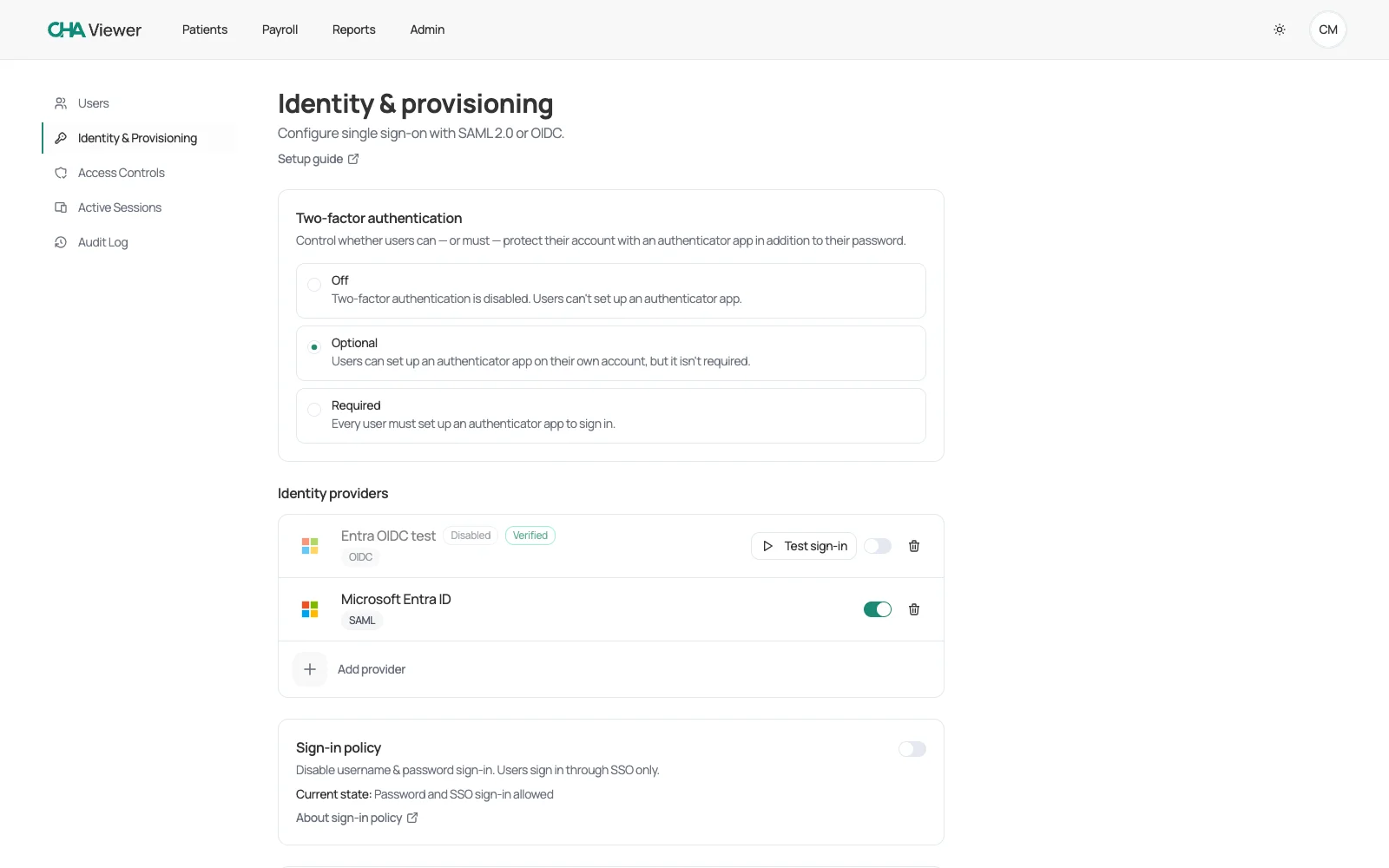
Connect any SAML or OpenID Connect identity provider — Microsoft Entra ID, Okta, Google, and others — through a guided setup with a built-in test sign-in, and map IdP groups to Viewer roles.
RESTful API
A RESTful API lets your EHR and third-party systems integrate with Viewer — supporting interoperability, faster partner-app development, and streamlined data exchange.
Trust
Security & Compliance
Hospital IT and compliance teams buy on this — Viewer is built to satisfy them, and identity and access control keeps shipping: five releases in the past two months alone.
Two-Factor Authentication
A second sign-in step with an authenticator app — set Off, Optional, or Required per organization. SSO users authenticate through their identity provider's own second factor.
Automatic Logoff
Viewer signs users out after a period of inactivity — with a warning first — protecting records on shared or unattended workstations (HIPAA automatic logoff).
Deny-by-Default Role-Based Access
A persona role model across seven permission domains, mapped to real hospital jobs — HIM/ROI, HR Payroll, Billing, Compliance Auditor, and more. A user with no assigned role sees nothing.
Active Session Control
Administrators see every staff sign-in session — source, login time, and IP — and can force logout any user's sessions on the spot.
Full Audit Trail
Every event is recorded with its originating IP address, giving administrators the oversight regulators expect.
Per-Tenant Data Isolation
Each organization's data lives in its own isolated tenant, kept separate from every other hospital's records.
HIPAA & HITECH Compliant
Data is stored off-site in its original format to meet HIPAA, HITECH, and regulatory retention standards.
FAQ
Common Questions
What kinds of data can CHA Viewer archive?
Which legacy systems does Viewer support?
How do you retire a legacy EHR system?
How long do hospitals need to retain medical records?
How does Viewer keep archived records secure?
How do staff sign in?
Can we still produce records for release of information (ROI)?
Is employee, payroll, and ERP archiving available?
For the full decommissioning sequence — freeze dates, contract notice, validation sign-off, and hardware disposal — read how to retire a legacy EHR system.
Multiple Legacy Systems. One Secure Login.
Retire costly servers and eliminate legacy vendor maintenance fees while keeping full data access for your staff.
Ready to Archive Your Legacy Data?
Schedule a demo to see how CHA Viewer consolidates your legacy systems into a single, secure, searchable platform.