Legacy System Archiving
MEDITECH Data Archiving
Retiring MAGIC, Client/Server, or an older 6.x environment? The chart history, the scanned documents, the A/R detail, and the report library each come out a different way. Each one is scoped separately, reconciled against the live system before anything is turned off, and landed in one view-only archive your staff work from — so the servers and the maintenance contract can finally go.
Platform Generations
Three Generations, One Retention Clock
MEDITECH has been in community hospitals long enough that most sites are retiring a platform a generation or two behind what they run today. Which generation holds the data decides how the data comes out.
MAGIC
The oldest generation still in service, built on MEDITECH's own MUMPS-derived MAGIC language. Data lives in hierarchical dictionaries and segments, not relational tables — there is nothing for a generic ETL tool to point at. Extraction runs through the application's own reporting layer, or through a Data Repository feed if one was ever built.
Client/Server (5.x)
The generation many community hospitals ran for roughly two decades, and many still do. The module names look familiar, but the internals differ enough from both MAGIC and 6.x that an extract built for one generation does not simply transfer to another.
6.x and Expanse
Better instrumented, and still not self-archiving. Hospitals consolidating rings, closing a facility, or leaving MEDITECH entirely hit the same problem with more data volume and more document types behind it.
Scope
A MEDITECH Retirement Is Not One Extract
The records your staff still need are spread across modules with different structures, different owners, and different retention rules. Scoping them one domain at a time is what keeps the project honest.
Patient and Clinical
Registration and visit history, abstracted and coded data from Medical Records, lab and radiology results, and the notes and scanned images sitting in Scanning and Archiving. Each of those has a different structure and a different extraction path.
Accounts and Billing
Billing and Accounts Receivable detail is what the business office still needs long after go-live: aged A/R follow-up, credit balances and refunds, payer audits, and cost-report support. It is also the data most often forgotten until someone asks for a 2019 account.
Payroll, HR, and Financials
General ledger, accounts payable, materials management, fixed assets, and payroll and personnel history. W-2 reprints, wage verifications, and audit support keep running for years after the clinical side goes quiet.
Modules that commonly appear in a MEDITECH archiving scope:
Clinical
Financial, HR, and payroll
Where These Projects Go Wrong
Five Things That Sink a MEDITECH Decommissioning
The Data Repository Is Not the Archive
MEDITECH's Data Repository is a Microsoft SQL Server mirror of structured data, and it is genuinely useful as an extraction source. It is not a complete record. How far back it reaches depends on whether the Initial Load was run for each application database when DR went live, so verify coverage per application rather than assuming it runs to your original go-live. It also mirrors current values rather than preserving how a record looked at a point in time, images and scanned documents live outside it, and it returns tables rather than the formatted chart an HIM tech recognizes. Assuming DR already is the archive is the most common mistake in these projects.
NPR Reports Stop the Day the System Does
Most long-running MEDITECH sites carry a large library of NPR (Non-Procedural Representation) reports, many written by people who have since retired. That library encodes real institutional logic — how a department defines a case, which fields it trusts. NPR runs inside MEDITECH. Decide before decommissioning which of those reports must be reproducible from the archive and which were only ever workflow tools.
Codes Without Dictionaries Are Unreadable
Much of a MEDITECH record is stored as pointers into site-built dictionaries. Pull the transactions without pulling and joining those dictionaries and you get a defensible-looking file full of codes nobody can read. Dictionary translation belongs in the extract, not in a cleanup pass afterward.
One Patient, Several Unit Numbers
Sites that added facilities over time often carry more than one unit number for the same person, plus account numbers that only mean something within their own facility. The archive has to match those identities. If it does not, the chart it returns is incomplete in a way nobody notices until a records request.
The Extract Needs the System Still Running
Every extract, reconciliation, and re-pull happens while MEDITECH is live and licensed. Hospitals that set the contract end date first and start the archive second lose the ability to go back for anything they missed. Sequence it the other way, and keep the environment available through validation.
After Decommission
What HIM Opens on Monday Morning
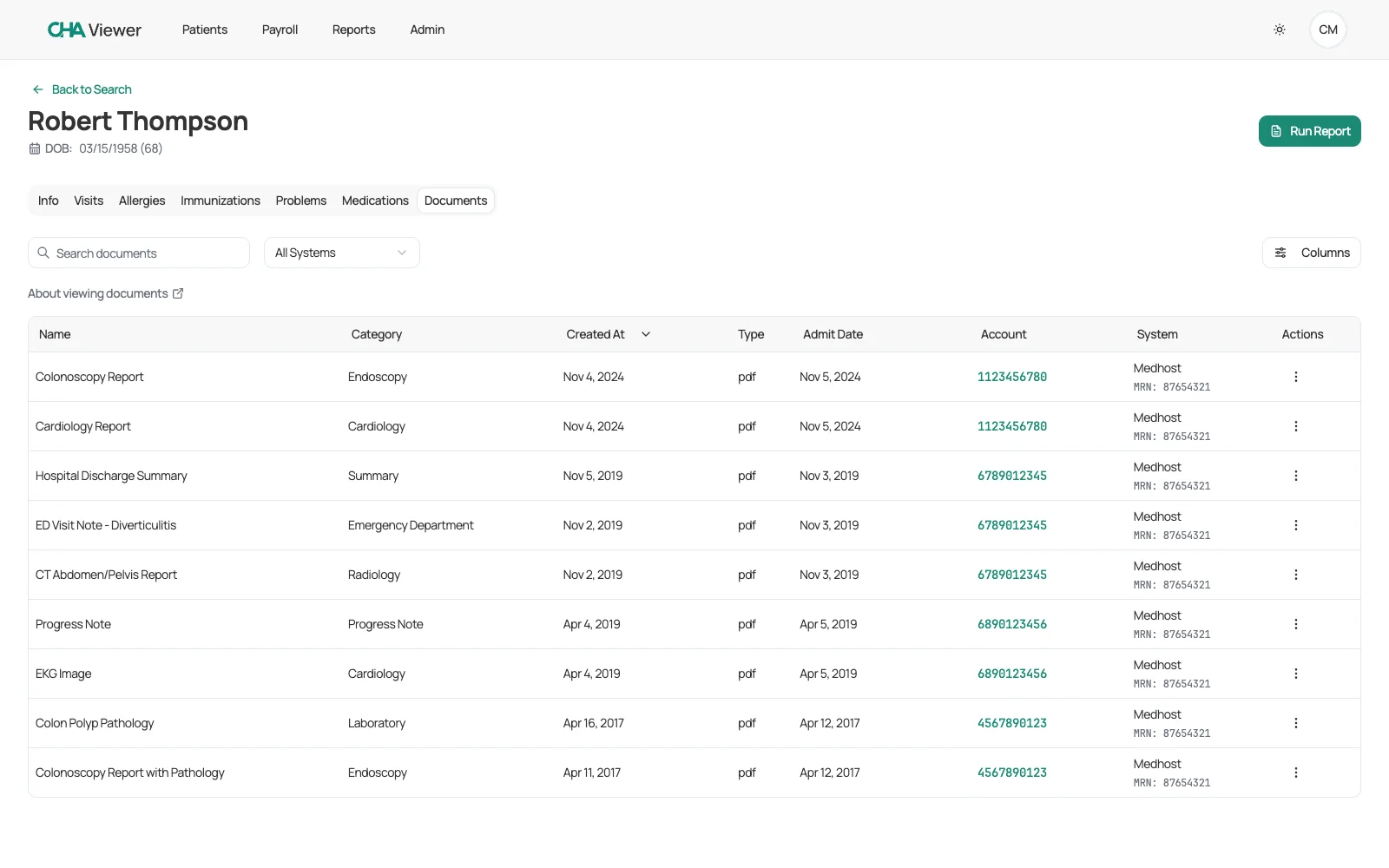
The archive has to survive the first records request, not the first demo. A MEDITECH record only reads correctly when the pieces arrive together: the document out of Scanning and Archiving, the account it was filed under, the unit number that identifies the patient, and the dictionary value behind every code.
- Scanned documents pulled from Scanning and Archiving, not only what the Data Repository could reach
- Unit numbers matched across facilities, so one patient returns one chart
- Account-level billing detail intact for aged A/R follow-up, refunds, and payer audits
- Dictionary values resolved, so codes read as the terms your staff actually used
Evaluation
What to Ask Before You Sign an Archiving Contract
These are the MEDITECH-specific questions that separate a real extraction plan from a data dump. Ask them of every vendor, including us.
- Which MEDITECH generation have you extracted from — MAGIC, Client/Server, 6.x, or Expanse?
- Are you pulling from the Data Repository only, or from the application itself as well?
- How far back does our Data Repository actually go, and what predates it?
- How do scanned documents and images come across, and in what format do they land?
- Do you translate dictionary pointers into readable values, or hand us raw codes?
- Can HIM produce a release-of-information packet from the archive, or only a table export?
- How will you reconcile record counts by module and by year before we turn anything off?
- How do you match multiple unit numbers for the same patient across facilities?
- Who keeps the SQL Server and Data Repository licensing alive during extraction, and for how long?
Sequence
A Realistic Decommissioning Timeline
Data volume, platform generation, and module count all move the dates — a single-facility critical access hospital moves faster than a multi-facility ring. What does not move is the order: every step before decommissioning has to finish while MEDITECH is still live and licensed.
Inventory and Scope
Start hereWhich modules are actually in use, which record types your retention schedule covers, who still signs in and why, and which NPR reports have to survive the system. This is also where the Data Repository gap gets measured.
Extract and Load
While MEDITECH is still liveStructured data module by module, dictionaries joined so values read as values, and documents and images pulled separately. Every record is tagged with the system and account it came from.
Validate Against the Live System
Before anything is turned offReconcile counts by module and by year, then spot-check real charts, real accounts, and real pay history side by side with MEDITECH while it is still up. Gaps found here are still fixable.
Go Live View-Only
Before the contract endsHIM, business office, HR, and compliance get role-based access to the archive and start working there instead of in MEDITECH. Sign-in volume in the legacy system should fall to zero.
Decommission
After sign-offCancel the maintenance agreement, retire the servers and the reporting SQL instance, and close the exposure of an unpatched system that still holds PHI.
Inventory and Scope
Which modules are actually in use, which record types your retention schedule covers, who still signs in and why, and which NPR reports have to survive the system. This is also where the Data Repository gap gets measured.
Extract and Load
Structured data module by module, dictionaries joined so values read as values, and documents and images pulled separately. Every record is tagged with the system and account it came from.
Validate Against the Live System
Reconcile counts by module and by year, then spot-check real charts, real accounts, and real pay history side by side with MEDITECH while it is still up. Gaps found here are still fixable.
Go Live View-Only
HIM, business office, HR, and compliance get role-based access to the archive and start working there instead of in MEDITECH. Sign-in volume in the legacy system should fall to zero.
Decommission
Cancel the maintenance agreement, retire the servers and the reporting SQL instance, and close the exposure of an unpatched system that still holds PHI.
FAQ
MEDITECH Archiving Questions
Can we archive MEDITECH data without leaving MEDITECH?
We already have the Data Repository. Isn't that our archive?
What happens to our NPR reports when we decommission?
We're replacing MEDITECH. Doesn't the conversion bring our history?
Can you archive MEDITECH financial and payroll data too?
Has CHA archived MEDITECH before?
Is CHA affiliated with MEDITECH?
Planning a MEDITECH Decommissioning?
Bring us your module list and your contract end date. We'll tell you what comes out cleanly, what needs a second pass, and what the sequence should look like.